EyeClops BioniCam Review
4.0 from 5
This is a great toy AND a useful tool for recording close-up images of a variety of objects. It has several limitations that I've learned to partially overcome. The worst one is poor performance on dark objects. Easier to correct is focusing problems.
I like to use it on rock and mineral samples, even though that is a difficult application. Lighting is the problem. For transperant objects, it is easy to put them on a glass plate or microscope slide and illuminate them from below using a small lamp, reflected sunlight, etc. Experiment and you'll find something that works. For dark opaque objects I've had some luck focusing in light from the side. I've got a spare eyeclops, so I'm planning to drill a strategically located hole in the "eyeball" to snake in a small battery powered white LED (available for - at hardware stores, flea markets, etc.) Tests with the outer eyeball unscrewed suggest that this will help a good deal.
Lighting is the key to good use of a microscope, so experiment with different light sources, lighting from different angles, etc.
Focus is easy - a tip follows. Depth of field is always shallow at high magnification. Vary the orientation of the object to get it "flat" to the focal plane, take multiple images focused at different depths, etc. Low magnification gives more depth of field, so examine objects at 100X before trying 200X or 400X. 200x is usually a better bet than 400X for most subjects.
Finally, the focusing tip: Place the subject on a sturdy flat surface (tabletop, glass plate, etc.). I'll call the flat surface a "stage". Screw the eyeball in a little so that it is focused slightly too close. Sit the eyeclops down on the stage, centered over the subject, and TILT the eyeclops slightly, resting an edge of the eyeclop's flat eyeball face on the stage. Obviously, as you tilt the eyeclops, you are moving the center hole where the camera is located slightly upwards, away from the subject. If the focus is SLIGHTLY too close, this movement will bring the subject into focus. Changing the tilt slightly will shift the focal plane through the depth of a 3-D object. Resting the eyeball edge on the stage will also steady the eyeclops and reduce hand shake.
Once this simple trick is grasped, it can be adapted to a variety of situations, sometimes with the aide of an improvised stage such as a stiff sheet of plastic with a small hole in it, etc.
The "tilt" trick is also easy for a child to learn and should make the eyeclops easier to master and less frustrating to use.
EyeClops BioniCam Overviews
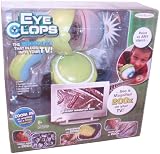
The EyeClops BioniCam Video Microscope from JAKKS Pacific opens up a world of microscopic fun for kids to explore. This bionic eye makes it easy to take digital pictures and capture video that documents new discoveries. Designed to keep inquisitive children aged eight and up entertained and interested in the world around them, the BioniCam is also engaging enough to captive adults.
 | What We Think
Fun Factor:
Durability:
(what this means)
The Good: Look at familiar objects in a whole new way; review images on a TV or computer
The Bad: Learning to focus the eye takes practice
In a Nutshell: Unique video microscope provides creepy close-ups and informal science lessons | At a GlanceAges: 8 and older
Requires: 5 AA batteries; TV and/or computer for full effect
|  |
|

A belt clip battery pack makes it easy to take the BioniCam anywhere. View larger. |

Even old blue jeans look cool viewed through the BioniCam. View Larger. |
Magnify Your World, To get started, simply insert five AA batteries (not included) into the belt clip battery pack, insert the included USB memory stick into the top of the BioniCam, and turn the unit on. With the camera's ergonomically shaped handle in one hand, you can focus on any number of everyday objects--such as coins, fabric, your pet's fur, or your own hair and skin. The magnified images appear in real time and full color on the LCD screen. Below the screen, you'll find easy to use buttons that allow you to navigate the menu, select video or photo options, review your gallery, and delete unwanted images.
A zoom dial offers either 100x, 200x or 400x magnification. To focus an image, twist the I.R.I.S. lens attachment until you achieve the results you're looking for. Getting a crisp image takes a little patience at first, especially at the highest magnification. But with practice and with the help of the easy-to-read focusing gauge, you'll be focusing the lens in no time.
Photos and Video Without Complicated Setup
With no software to upload and minimal set-up, the BioniCam makes sharing discoveries easy. Plug the USB memory stick directly into your computer for quick access to images, then save and edit them or post them to your blog. Alternately, you can use the included video cable to display images on your TV. When you are plugged into the TV, the LCD screen turns off, but you still retain all the functionality of the BioniCam. This makes reviewing huge enlargements in real time a fun group activity.
Contagious Fun for the Whole Family
The hand-held magnification "eye" is fun to hold and makes it easy for your child to explore the microscopic world without complicated scientific instruments. Viewing the magnified images on your computer or TV screen in full, vivid color encourages kids to take learning into their own hands and provides numerous opportunities for parents and children to play fun and educational games together.
The excitement of seeing objects in your child's everyday world magnified to up to 400 times is sure to be a hit with whole family. Fortunately, the lightweight, durable plastic unit fits comfortably into both small and large hands. And if you need some help getting started, the easy-to-read instruction booklet offers lots of tips for finding items that hide interesting textures, from pine needles to sponges and insects.
On the lowest setting, the LEDs occasionally prove too bright for viewing lighter-colored objects, and these images may remain unclear on large viewing screens. On the higher magnification settings, however, this did not seem to be a problem, as textures and colors came through flawlessly. And while the battery pack makes it easy to explore indoors and out, the LCD screen can be tough to read in direct sunlight.
Overall, these are minor concerns that should do nothing to prevent this fun, educational toy from being big hit with all kinds of kids.
What's in the Box
BioniCam, I.R.I.S. lens attachment, removable USB drive, and video cable.
EyeClops BioniCam Specifications
With a full color LCD screen and battery pack, Eyeclops is the perfect on-the-go device that lets kids explore the world around them, indoors or out. Use the LCD screen as a viewfinder for specimens, zoom in with one of three powerful new magnifications (100x, 200x and an eye-popping 400x) and take digital pictures and video of your amazing discoveries. Save and share your findings with the built-in flash drive and removable USB key. Then, view them on any standard television, and upload your files to your PC to email and send to friends. Requires 5 "AA" batteries, not included. Measures 12"L x 15.75"W x 4.25"H.
Check Best Price Now !!
Related Products
*Product Information Stored: Dec 29, 2009 06:30:07